
Changelog

Follow new updates and improvements to Fresh Projects.

Contacts + Interactions, now on mobile

What’s New:

  • Capture contacts on the move: You can now add and edit contact details right in the mobile app, so you can save a new client’s details on the spot.

  • Interactions categorised and filed: Record conversations with contacts, building up a history you can look back through whenever you need it.

  • Call or email from the app: Start a call or send an email straight from a contact's page, and we'll automatically create a draft interaction for it.

Why This Matters

  • Made for site visits and travel: The details get captured when and where the work actually happens, rather than waiting until you're back at your desk.

  • Mobile and web stay in sync: Whatever you save on your phone is there on web straight away, and vice versa.

  • Nothing gets lost in between: Fewer notes on the back of a business card, and fewer conversations you're half-remembering three days later.

Update to the latest version of the app from the App Store or Google Play to start using it. If you have any questions, we're always happy to help. 🚀

New

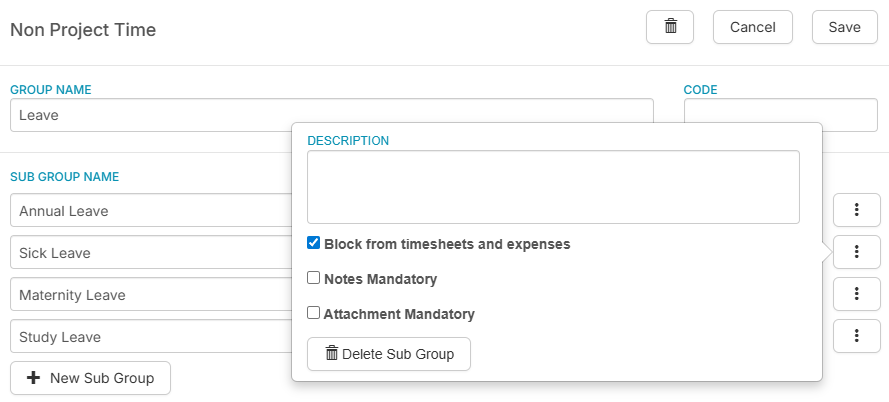
Take Control of How Leave is Captured ✏️🖥️💡

Feature Spotlight:

  • Block Leave Capture in Timesheets: You can now prevent employees from logging time against leave categories directly in their timesheet, ensuring leave is handled through the correct process.

  • Applications Feed the Timesheet: When leave is submitted and approved, it populates the timesheet automatically, so nothing falls through the cracks.

Why This Matters:

  • Consistent Data: Timesheet entries and leave applications always align, removing the risk of discrepancies.

  • Proper Process, Every Time: Leave goes through the right approval channel before it appears anywhere, giving managers and payroll a reliable record.

🚀 If you'd like help configuring this for your team, get in touch and we'll walk you through it.

Two-Way Budgeting is Here ↔️

What’s New:

  • A more natural way to budget: You can now schedule resources in the Project Planner and have those values feed directly into the budget section of your project page.

  • A two-way connection: Previously, budget values flowed one way, from the project budget into the Project Planner. Now it works in both directions, so your resource scheduling and your budget can grow together as you plan.

  • Work the way your project actually unfolds: If it makes sense to plan your team's time before locking in budget figures, you can now do exactly that, and everything stays in sync.

Why This Matters:

  • More flexibility in how you plan: Schedule your resources as part of building your budget, in whatever order suits your project.

  • No more double-handling: Your resource schedule carries through to your budget automatically, so you're not re-entering the same figures in two places.

This one isn't switched on by default, so when you're ready to give it a go, just get in touch and we'll get it set up for you 🚀

Improved

Earlier updates